> ## Documentation Index
> Fetch the complete documentation index at: https://auth0-chore-events-autoupdate.mintlify.site/llms.txt
> Use this file to discover all available pages before exploring further.
# How to List and Search Users with Search Queries
> Retrieve a list of all user profiles and filter results with Lucene search query strings.
export const AuthCodeGroup = ({children, dropdown}) => {
const [processedChildren, setProcessedChildren] = useState(children);
useEffect(() => {
let unsubscribe = null;
function init() {
unsubscribe = window.autorun(() => {
const processChildren = node => {
if (typeof node === "string") {
let processedNode = node;
for (const [key, value] of window.rootStore.variableStore.values.entries()) {
const escapedKey = key.replaceAll(/[.*+?^${}()|[\]\\]/g, (String.raw)`\$&`);
processedNode = processedNode.replaceAll(new RegExp(escapedKey, "g"), value);
}
return processedNode;
} else if (Array.isArray(node)) {
return node.map(processChildren);
} else if (node && node.props && node.props.children) {
return {
...node,
props: {
...node.props,
children: processChildren(node.props.children)
}
};
}
return node;
};
setProcessedChildren(processChildren(children));
});
}
if (window.rootStore) {
init();
} else {
window.addEventListener("adu:storeReady", init);
}
return () => {
window.removeEventListener("adu:storeReady", init);
unsubscribe?.();
};
}, [children]);
return {processedChildren};
};
export const AuthCodeBlock = ({filename, icon, language, highlight, children}) => {
const [displayText, setDisplayText] = useState(children);
const [copyText, setCopyText] = useState(children);
const wrapperRef = React.useRef(null);
useEffect(() => {
let unsubscribe = null;
function init() {
if (!window.autorun || !window.rootStore) {
return;
}
unsubscribe = window.autorun(() => {
let processedChildrenForDisplay = children;
let processedChildrenForCopy = children;
for (const [key, value] of window.rootStore.variableStore.values.entries()) {
const escapedKey = key.replaceAll(/[.*+?^${}()|[\]\\]/g, (String.raw)`\$&`);
let displayValue = value;
if (key === "{yourClientSecret}" && value !== "{yourClientSecret}") {
displayValue = value.substring(0, 3) + "*****MASKED*****";
}
processedChildrenForDisplay = processedChildrenForDisplay.replaceAll(new RegExp(escapedKey, "g"), displayValue);
processedChildrenForCopy = processedChildrenForCopy.replaceAll(new RegExp(escapedKey, "g"), value);
}
setDisplayText(processedChildrenForDisplay);
setCopyText(processedChildrenForCopy);
});
}
if (window.rootStore) {
init();
} else {
window.addEventListener("adu:storeReady", init);
}
return () => {
window.removeEventListener("adu:storeReady", init);
unsubscribe?.();
};
}, [children]);
useEffect(() => {
if (!wrapperRef.current) return;
const originalWriteText = navigator.clipboard.writeText.bind(navigator.clipboard);
let isOverriding = false;
const handleClick = e => {
const button = e.target.closest('[data-testid="copy-code-button"]');
if (!button || !wrapperRef.current.contains(button)) return;
isOverriding = true;
navigator.clipboard.writeText = text => {
if (isOverriding) {
isOverriding = false;
navigator.clipboard.writeText = originalWriteText;
return originalWriteText(copyText);
}
return originalWriteText(text);
};
setTimeout(() => {
if (isOverriding) {
isOverriding = false;
navigator.clipboard.writeText = originalWriteText;
}
}, 100);
};
const wrapper = wrapperRef.current;
wrapper.addEventListener('click', handleClick, true);
return () => {
wrapper.removeEventListener('click', handleClick, true);
if (navigator.clipboard.writeText !== originalWriteText) {
navigator.clipboard.writeText = originalWriteText;
}
};
}, [copyText]);
return
{displayText}
;
};
Using the Auth0 Dashboard or the Management API, you can retrieve a list of users and filter results by search criteria you specify.
## List and search for users
To view a list of users, go to [Dashboard > User Management > Users](https://manage.auth0.com/#/users).
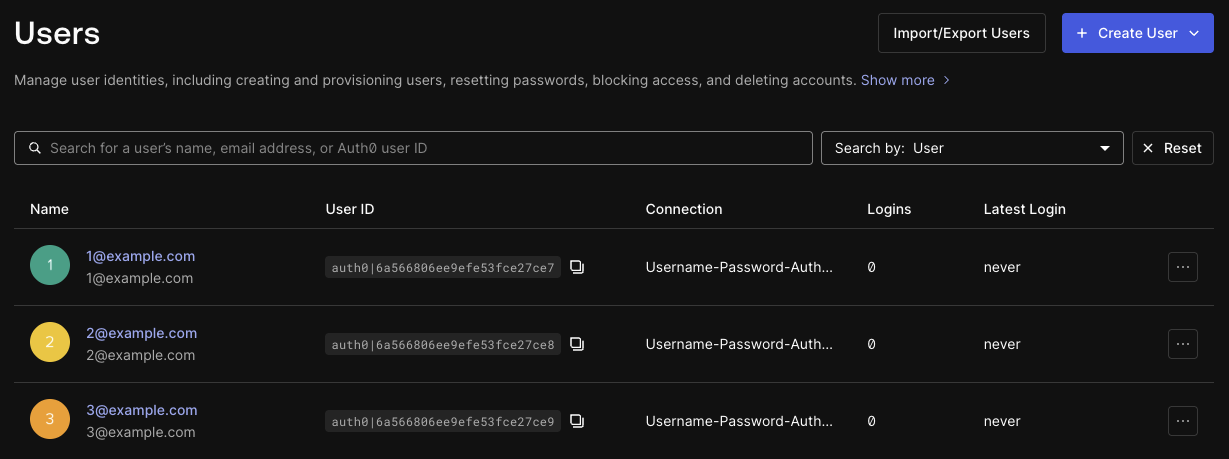 The search field and drop-down menu at the top of the page lets you search by the following properties:
* User
* Email
* Identity provider
* Connection
* Organization ID
* Login count
* Last login
* Phone number
You can also choose **Lucene Syntax (Advanced)** to specify search criteria. The [search query syntax reference](./user-search-query-syntax) includes more information on supported search features and example queries.
To list all users with the Management API, call the [List or Search Users endpoint](/docs/api/management/v2/users/get-users) (`GET /users`). To search for users, specify search criteria with the [`q` query parameter](/docs/api/management/v2/users/get-users#parameter-q) and a [Lucene search query string](./user-search-query-syntax).
**The List or Search Users endpoint is not suitable for use in latency-sensitive or correctness-critical paths.**
This endpoint is eventually consistent and has a short query time limit. Learn more about [user search alternatives, limits, and performance best practices](/docs/manage-users/user-search/user-search-best-practices).
For example, to search for a user whose name is exactly `example`:
Using the Auth0 CLI? If you haven't already, [set up and authenticate your CLI session](/docs/deploy-monitor/auth0-cli) before running this command.
```bash Auth0 CLI theme={null}
auth0 api get "users" \
-q "q=name%3A%22example%22" \
-q "search_engine=v3"
```
```bash curl theme={null}
curl --request GET \
--url 'https://{yourDomain}/api/v2/users?q=name%3A%22example%22&search_engine=v3' \
--header 'authorization: Bearer {yourMgmtApiAccessToken}'
```
```csharp C# theme={null}
var client = new RestClient("https://{yourDomain}/api/v2/users?q=name%3A%22example%22&search_engine=v3");
var request = new RestRequest(Method.GET);
request.AddHeader("authorization", "Bearer {yourMgmtApiAccessToken}");
IRestResponse response = client.Execute(request);
```
```go Go theme={null}
package main
import (
"fmt"
"net/http"
"io/ioutil"
)
func main() {
url := "https://{yourDomain}/api/v2/users?q=name%3A%22example%22&search_engine=v3"
req, _ := http.NewRequest("GET", url, nil)
req.Header.Add("authorization", "Bearer {yourMgmtApiAccessToken}")
res, _ := http.DefaultClient.Do(req)
defer res.Body.Close()
body, _ := ioutil.ReadAll(res.Body)
fmt.Println(res)
fmt.Println(string(body))
}
```
```java Java theme={null}
HttpResponse response = Unirest.get("https://{yourDomain}/api/v2/users?q=name%3A%22example%22&search_engine=v3")
.header("authorization", "Bearer {yourMgmtApiAccessToken}")
.asString();
```
```javascript Node.JS theme={null}
var axios = require("axios").default;
var options = {
method: 'GET',
url: 'https://{yourDomain}/api/v2/users',
params: {q: 'name:"example"', search_engine: 'v3'},
headers: {authorization: 'Bearer {yourMgmtApiAccessToken}'}
};
axios.request(options).then(function (response) {
console.log(response.data);
}).catch(function (error) {
console.error(error);
});
```
```php PHP theme={null}
$curl = curl_init();
curl_setopt_array($curl, [
CURLOPT_URL => "https://{yourDomain}/api/v2/users?q=name%3A%22example%22&search_engine=v3",
CURLOPT_RETURNTRANSFER => true,
CURLOPT_ENCODING => "",
CURLOPT_MAXREDIRS => 10,
CURLOPT_TIMEOUT => 30,
CURLOPT_HTTP_VERSION => CURL_HTTP_VERSION_1_1,
CURLOPT_CUSTOMREQUEST => "GET",
CURLOPT_HTTPHEADER => [
"authorization: Bearer {yourMgmtApiAccessToken}"
],
]);
$response = curl_exec($curl);
$err = curl_error($curl);
curl_close($curl);
if ($err) {
echo "curl Error #:" . $err;
} else {
echo $response;
}
```
```python Python theme={null}
import http.client
conn = http.client.HTTPSConnection("")
headers = { 'authorization': "Bearer {yourMgmtApiAccessToken}" }
conn.request("GET", "/{yourDomain}/api/v2/users?q=name%3A%22example%22&search_engine=v3", headers=headers)
res = conn.getresponse()
data = res.read()
print(data.decode("utf-8"))
```
```ruby Ruby theme={null}
require 'uri'
require 'net/http'
require 'openssl'
url = URI("https://{yourDomain}/api/v2/users?q=name%3A%22example%22&search_engine=v3")
http = Net::HTTP.new(url.host, url.port)
http.use_ssl = true
http.verify_mode = OpenSSL::SSL::VERIFY_PEER
request = Net::HTTP::Get.new(url)
request["authorization"] = 'Bearer {yourMgmtApiAccessToken}'
response = http.request(request)
puts response.read_body
```
Search queries time out (HTTP status code 503) if they don't complete in two seconds or less. If your search query times out, it may be an expensive query or it may have an error that results in it not completing in time.
The error `414 Request-URI Too Large` means that your query string is larger than the supported length. In this case, refine your search.
The [search query syntax reference](./user-search-query-syntax) includes more information on supported search features and example queries.
## Sort results
In the Auth0 Dashboard, you can sort results by selecting the columns available in the table of users:
* Name
* User ID
* Connection
* Logins
* Latest Login
Select the column title once to sort in ascending order and again to sort in descending order. To sort results by other fields, use the Management API.
To sort user search results, set the [`sort` query parameter](/docs/api/management/v2/users/get-users#parameter-sort) to the value `field:order`, where:
* `field` is the name of the field to sort by
* `order` is `1` for ascending or `-1` for descending.
For example, to sort users in ascending order by their creation time, set the `sort` parameter to `created_at:1`:
```bash Auth0 CLI theme={null}
auth0 api get "users" \
-q "q=logins_count%3A%5B100%20TO%20200%5D" \
-q "sort=created_at%3A1" \
-q "search_engine=v3"
```
```bash curl theme={null}
curl --request GET \
--url 'https://{yourDomain}/api/v2/users?q=logins_count%3A%5B100%20TO%20200%5D&sort=created_at%3A1&search_engine=v3' \
--header 'authorization: Bearer {yourMgmtApiAccessToken}'
```
```csharp C# theme={null}
var client = new RestClient("https://{yourDomain}/api/v2/users?q=logins_count%3A%5B100%20TO%20200%5D&sort=created_at%3A1&search_engine=v3");
var request = new RestRequest(Method.GET);
request.AddHeader("authorization", "Bearer {yourMgmtApiAccessToken}");
IRestResponse response = client.Execute(request);
```
```go Go theme={null}
package main
import (
"fmt"
"net/http"
"io/ioutil"
)
func main() {
url := "https://{yourDomain}/api/v2/users?q=logins_count%3A%5B100%20TO%20200%5D&sort=created_at%3A1&search_engine=v3"
req, _ := http.NewRequest("GET", url, nil)
req.Header.Add("authorization", "Bearer {yourMgmtApiAccessToken}")
res, _ := http.DefaultClient.Do(req)
defer res.Body.Close()
body, _ := ioutil.ReadAll(res.Body)
fmt.Println(res)
fmt.Println(string(body))
}
```
```java Java theme={null}
HttpResponse response = Unirest.get("https://{yourDomain}/api/v2/users?q=logins_count%3A%5B100%20TO%20200%5D&sort=created_at%3A1&search_engine=v3")
.header("authorization", "Bearer {yourMgmtApiAccessToken}")
.asString();
```
```javascript Node.JS theme={null}
var axios = require("axios").default;
var options = {
method: 'GET',
url: 'https://{yourDomain}/api/v2/users',
params: {q: 'logins_count:[100 TO 200]', sort: 'created_at:1', search_engine: 'v3'},
headers: {authorization: 'Bearer {yourMgmtApiAccessToken}'}
};
axios.request(options).then(function (response) {
console.log(response.data);
}).catch(function (error) {
console.error(error);
});
```
```php PHP theme={null}
$curl = curl_init();
curl_setopt_array($curl, [
CURLOPT_URL => "https://{yourDomain}/api/v2/users?q=logins_count%3A%5B100%20TO%20200%5D&sort=created_at%3A1&search_engine=v3",
CURLOPT_RETURNTRANSFER => true,
CURLOPT_ENCODING => "",
CURLOPT_MAXREDIRS => 10,
CURLOPT_TIMEOUT => 30,
CURLOPT_HTTP_VERSION => CURL_HTTP_VERSION_1_1,
CURLOPT_CUSTOMREQUEST => "GET",
CURLOPT_HTTPHEADER => [
"authorization: Bearer {yourMgmtApiAccessToken}"
],
]);
$response = curl_exec($curl);
$err = curl_error($curl);
curl_close($curl);
if ($err) {
echo "curl Error #:" . $err;
} else {
echo $response;
}
```
```python Python theme={null}
import http.client
conn = http.client.HTTPSConnection("")
headers = { 'authorization': "Bearer {yourMgmtApiAccessToken}" }
conn.request("GET", "/{yourDomain}/api/v2/users?q=logins_count%3A%5B100%20TO%20200%5D&sort=created_at%3A1&search_engine=v3", headers=headers)
res = conn.getresponse()
data = res.read()
print(data.decode("utf-8"))
```
```ruby Ruby theme={null}
require 'uri'
require 'net/http'
require 'openssl'
url = URI("https://{yourDomain}/api/v2/users?q=logins_count%3A%5B100%20TO%20200%5D&sort=created_at%3A1&search_engine=v3")
http = Net::HTTP.new(url.host, url.port)
http.use_ssl = true
http.verify_mode = OpenSSL::SSL::VERIFY_PEER
request = Net::HTTP::Get.new(url)
request["authorization"] = 'Bearer {yourMgmtApiAccessToken}'
response = http.request(request)
puts response.read_body
```
The search field and drop-down menu at the top of the page lets you search by the following properties:
* User
* Email
* Identity provider
* Connection
* Organization ID
* Login count
* Last login
* Phone number
You can also choose **Lucene Syntax (Advanced)** to specify search criteria. The [search query syntax reference](./user-search-query-syntax) includes more information on supported search features and example queries.
To list all users with the Management API, call the [List or Search Users endpoint](/docs/api/management/v2/users/get-users) (`GET /users`). To search for users, specify search criteria with the [`q` query parameter](/docs/api/management/v2/users/get-users#parameter-q) and a [Lucene search query string](./user-search-query-syntax).
**The List or Search Users endpoint is not suitable for use in latency-sensitive or correctness-critical paths.**
This endpoint is eventually consistent and has a short query time limit. Learn more about [user search alternatives, limits, and performance best practices](/docs/manage-users/user-search/user-search-best-practices).
For example, to search for a user whose name is exactly `example`:
Using the Auth0 CLI? If you haven't already, [set up and authenticate your CLI session](/docs/deploy-monitor/auth0-cli) before running this command.
```bash Auth0 CLI theme={null}
auth0 api get "users" \
-q "q=name%3A%22example%22" \
-q "search_engine=v3"
```
```bash curl theme={null}
curl --request GET \
--url 'https://{yourDomain}/api/v2/users?q=name%3A%22example%22&search_engine=v3' \
--header 'authorization: Bearer {yourMgmtApiAccessToken}'
```
```csharp C# theme={null}
var client = new RestClient("https://{yourDomain}/api/v2/users?q=name%3A%22example%22&search_engine=v3");
var request = new RestRequest(Method.GET);
request.AddHeader("authorization", "Bearer {yourMgmtApiAccessToken}");
IRestResponse response = client.Execute(request);
```
```go Go theme={null}
package main
import (
"fmt"
"net/http"
"io/ioutil"
)
func main() {
url := "https://{yourDomain}/api/v2/users?q=name%3A%22example%22&search_engine=v3"
req, _ := http.NewRequest("GET", url, nil)
req.Header.Add("authorization", "Bearer {yourMgmtApiAccessToken}")
res, _ := http.DefaultClient.Do(req)
defer res.Body.Close()
body, _ := ioutil.ReadAll(res.Body)
fmt.Println(res)
fmt.Println(string(body))
}
```
```java Java theme={null}
HttpResponse response = Unirest.get("https://{yourDomain}/api/v2/users?q=name%3A%22example%22&search_engine=v3")
.header("authorization", "Bearer {yourMgmtApiAccessToken}")
.asString();
```
```javascript Node.JS theme={null}
var axios = require("axios").default;
var options = {
method: 'GET',
url: 'https://{yourDomain}/api/v2/users',
params: {q: 'name:"example"', search_engine: 'v3'},
headers: {authorization: 'Bearer {yourMgmtApiAccessToken}'}
};
axios.request(options).then(function (response) {
console.log(response.data);
}).catch(function (error) {
console.error(error);
});
```
```php PHP theme={null}
$curl = curl_init();
curl_setopt_array($curl, [
CURLOPT_URL => "https://{yourDomain}/api/v2/users?q=name%3A%22example%22&search_engine=v3",
CURLOPT_RETURNTRANSFER => true,
CURLOPT_ENCODING => "",
CURLOPT_MAXREDIRS => 10,
CURLOPT_TIMEOUT => 30,
CURLOPT_HTTP_VERSION => CURL_HTTP_VERSION_1_1,
CURLOPT_CUSTOMREQUEST => "GET",
CURLOPT_HTTPHEADER => [
"authorization: Bearer {yourMgmtApiAccessToken}"
],
]);
$response = curl_exec($curl);
$err = curl_error($curl);
curl_close($curl);
if ($err) {
echo "curl Error #:" . $err;
} else {
echo $response;
}
```
```python Python theme={null}
import http.client
conn = http.client.HTTPSConnection("")
headers = { 'authorization': "Bearer {yourMgmtApiAccessToken}" }
conn.request("GET", "/{yourDomain}/api/v2/users?q=name%3A%22example%22&search_engine=v3", headers=headers)
res = conn.getresponse()
data = res.read()
print(data.decode("utf-8"))
```
```ruby Ruby theme={null}
require 'uri'
require 'net/http'
require 'openssl'
url = URI("https://{yourDomain}/api/v2/users?q=name%3A%22example%22&search_engine=v3")
http = Net::HTTP.new(url.host, url.port)
http.use_ssl = true
http.verify_mode = OpenSSL::SSL::VERIFY_PEER
request = Net::HTTP::Get.new(url)
request["authorization"] = 'Bearer {yourMgmtApiAccessToken}'
response = http.request(request)
puts response.read_body
```
Search queries time out (HTTP status code 503) if they don't complete in two seconds or less. If your search query times out, it may be an expensive query or it may have an error that results in it not completing in time.
The error `414 Request-URI Too Large` means that your query string is larger than the supported length. In this case, refine your search.
The [search query syntax reference](./user-search-query-syntax) includes more information on supported search features and example queries.
## Sort results
In the Auth0 Dashboard, you can sort results by selecting the columns available in the table of users:
* Name
* User ID
* Connection
* Logins
* Latest Login
Select the column title once to sort in ascending order and again to sort in descending order. To sort results by other fields, use the Management API.
To sort user search results, set the [`sort` query parameter](/docs/api/management/v2/users/get-users#parameter-sort) to the value `field:order`, where:
* `field` is the name of the field to sort by
* `order` is `1` for ascending or `-1` for descending.
For example, to sort users in ascending order by their creation time, set the `sort` parameter to `created_at:1`:
```bash Auth0 CLI theme={null}
auth0 api get "users" \
-q "q=logins_count%3A%5B100%20TO%20200%5D" \
-q "sort=created_at%3A1" \
-q "search_engine=v3"
```
```bash curl theme={null}
curl --request GET \
--url 'https://{yourDomain}/api/v2/users?q=logins_count%3A%5B100%20TO%20200%5D&sort=created_at%3A1&search_engine=v3' \
--header 'authorization: Bearer {yourMgmtApiAccessToken}'
```
```csharp C# theme={null}
var client = new RestClient("https://{yourDomain}/api/v2/users?q=logins_count%3A%5B100%20TO%20200%5D&sort=created_at%3A1&search_engine=v3");
var request = new RestRequest(Method.GET);
request.AddHeader("authorization", "Bearer {yourMgmtApiAccessToken}");
IRestResponse response = client.Execute(request);
```
```go Go theme={null}
package main
import (
"fmt"
"net/http"
"io/ioutil"
)
func main() {
url := "https://{yourDomain}/api/v2/users?q=logins_count%3A%5B100%20TO%20200%5D&sort=created_at%3A1&search_engine=v3"
req, _ := http.NewRequest("GET", url, nil)
req.Header.Add("authorization", "Bearer {yourMgmtApiAccessToken}")
res, _ := http.DefaultClient.Do(req)
defer res.Body.Close()
body, _ := ioutil.ReadAll(res.Body)
fmt.Println(res)
fmt.Println(string(body))
}
```
```java Java theme={null}
HttpResponse response = Unirest.get("https://{yourDomain}/api/v2/users?q=logins_count%3A%5B100%20TO%20200%5D&sort=created_at%3A1&search_engine=v3")
.header("authorization", "Bearer {yourMgmtApiAccessToken}")
.asString();
```
```javascript Node.JS theme={null}
var axios = require("axios").default;
var options = {
method: 'GET',
url: 'https://{yourDomain}/api/v2/users',
params: {q: 'logins_count:[100 TO 200]', sort: 'created_at:1', search_engine: 'v3'},
headers: {authorization: 'Bearer {yourMgmtApiAccessToken}'}
};
axios.request(options).then(function (response) {
console.log(response.data);
}).catch(function (error) {
console.error(error);
});
```
```php PHP theme={null}
$curl = curl_init();
curl_setopt_array($curl, [
CURLOPT_URL => "https://{yourDomain}/api/v2/users?q=logins_count%3A%5B100%20TO%20200%5D&sort=created_at%3A1&search_engine=v3",
CURLOPT_RETURNTRANSFER => true,
CURLOPT_ENCODING => "",
CURLOPT_MAXREDIRS => 10,
CURLOPT_TIMEOUT => 30,
CURLOPT_HTTP_VERSION => CURL_HTTP_VERSION_1_1,
CURLOPT_CUSTOMREQUEST => "GET",
CURLOPT_HTTPHEADER => [
"authorization: Bearer {yourMgmtApiAccessToken}"
],
]);
$response = curl_exec($curl);
$err = curl_error($curl);
curl_close($curl);
if ($err) {
echo "curl Error #:" . $err;
} else {
echo $response;
}
```
```python Python theme={null}
import http.client
conn = http.client.HTTPSConnection("")
headers = { 'authorization': "Bearer {yourMgmtApiAccessToken}" }
conn.request("GET", "/{yourDomain}/api/v2/users?q=logins_count%3A%5B100%20TO%20200%5D&sort=created_at%3A1&search_engine=v3", headers=headers)
res = conn.getresponse()
data = res.read()
print(data.decode("utf-8"))
```
```ruby Ruby theme={null}
require 'uri'
require 'net/http'
require 'openssl'
url = URI("https://{yourDomain}/api/v2/users?q=logins_count%3A%5B100%20TO%20200%5D&sort=created_at%3A1&search_engine=v3")
http = Net::HTTP.new(url.host, url.port)
http.use_ssl = true
http.verify_mode = OpenSSL::SSL::VERIFY_PEER
request = Net::HTTP::Get.new(url)
request["authorization"] = 'Bearer {yourMgmtApiAccessToken}'
response = http.request(request)
puts response.read_body
```